Connecting Your Agent to MCP
Build an MCP server from scratch and connect your agent to it. The standard protocol for giving AI agents access to tools, data, and services.
In Section 0c, we built an agent with three tools: search, calculator, and word_count. Those tools lived in the same Python file as the agent. The agent imported them directly. This works fine when you control everything.
But what happens when your agent needs to use a tool maintained by another team? Or a database that lives on a different server? Or a third-party service that updates its API every quarter? You could write custom integration code for each one. If you have 5 agents and 10 tools, that is 50 integrations to build and maintain.
MCP solves this problem.
What is MCP?
MCP (Model Context Protocol) is an open standard for connecting AI applications to tools, data sources, and services. It was created by Anthropic and is now the most widely adopted protocol for agent-to-tool communication.
The analogy: MCP is USB-C for AI. Before USB-C, every phone had a different charger. You needed a drawer full of cables. USB-C standardized the connector so one cable works with everything. MCP does the same for agent tools: each tool implements the server once, each agent implements the client once, and they all work together.
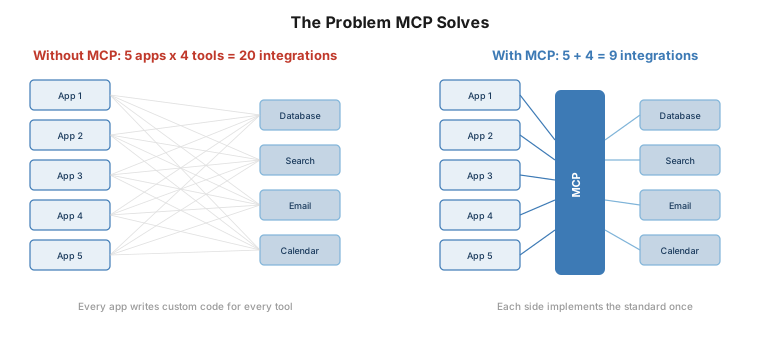
The three roles
Every MCP interaction has three participants:
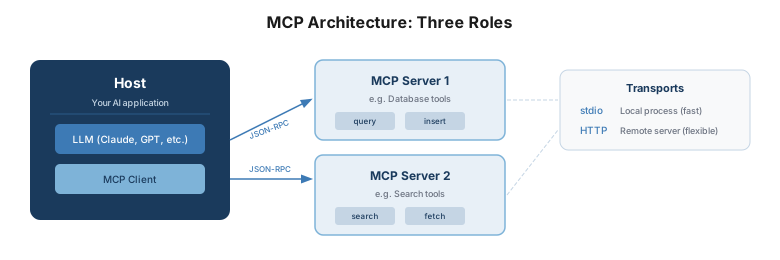
Host. Your AI application. Claude Desktop, VS Code with Copilot, or the custom agent you built in Section 0c. The host contains the LLM and one or more MCP clients.
Client. A connector that maintains a session with one MCP server. The client handles the protocol: initialization, tool discovery, and tool invocation. Most of the time, you use a library for this (the MCP Python SDK or TypeScript SDK). You do not write the client from scratch.
Server. A program that exposes tools, data, or services over MCP. This is what you build. A server says: “Here are the tools I offer, here are their parameters, call me when you need them.”
How the protocol works
When your agent connects to an MCP server, four things happen in sequence:
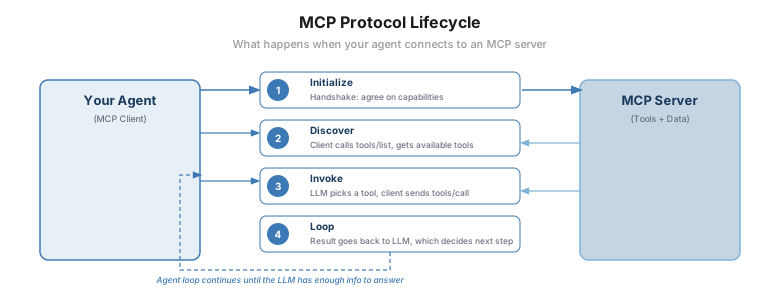
Step 1: Initialize. The client and server perform a handshake. Each side declares what protocol version it supports and what capabilities it offers. This happens once when the connection starts.
Step 2: Discover. The client calls tools/list. The server responds with a list of available tools — each with a name, a description, and a JSON Schema defining its parameters. This is the same schema format the LLM uses for function calling (Section 0b). The client feeds these tool definitions to the LLM so the model knows what it can call.
Step 3: Invoke. When the LLM decides to use a tool, it generates a tool call (just like in Section 0c). The MCP client sends tools/call with the tool name and arguments. The server executes the tool and returns the result.
Step 4: Loop. The result goes back to the LLM’s context. The LLM decides whether it has enough information to answer or needs to call another tool. This is the same agent loop from Section 0c — MCP does not change the loop. It changes where the tools live.
The protocol runs on JSON-RPC 2.0 — a simple request/response format over two transports:
- stdio — for local servers running as subprocesses on the same machine. Fast, no network. This is what you use during development and for tools that access local files.
- Streamable HTTP — for remote servers accessible over the network. Supports authentication, streaming, and session management. This is what you use in production.
Building your first MCP server
Let’s build a simple MCP server that exposes three tools: a unit converter, a word counter, and a random fact generator. We will use the official MCP Python SDK.
Install the SDK
pip install mcpThe server code
Create a file called my_server.py:
from mcp.server.fastmcp import FastMCP

# Create the server
mcp = FastMCP("My First MCP Server")


@mcp.tool()
def convert_temperature(celsius: float) -> str:
    """Convert a temperature from Celsius to Fahrenheit."""
    fahrenheit = (celsius * 9 / 5) + 32
    return f"{celsius}°C = {fahrenheit}°F"


@mcp.tool()
def word_count(text: str) -> str:
    """Count the number of words in a text."""
    count = len(text.split())
    return f"The text contains {count} words."


@mcp.tool()
def reverse_text(text: str) -> str:
    """Reverse a string of text."""
    return text[::-1]
That is the entire server. Three things to notice:
-
@mcp.tool()is all you need. The decorator registers the function as an MCP tool. The SDK automatically generates the JSON Schema from the function signature and docstring. The function name becomes the tool name. The docstring becomes the tool description that the LLM reads. -
The function parameters are the tool parameters.
celsius: floatbecomes a required parameter of typenumberin the schema. Python type hints do the work. -
Return a string. MCP tool results are content blocks. For simple tools, return a string and the SDK wraps it as text content.
Run the server
For local development, run it with stdio transport:
python my_server.pyOr for HTTP transport (accessible over the network):
mcp run my_server.py --transport http --port 8080Test it with the MCP Inspector
The MCP Inspector is a browser-based tool that lets you test your server without writing a client:
npx @modelcontextprotocol/inspectorThis opens a web UI where you can connect to your server, see the available tools, and call them interactively. Use this to verify your server works before connecting an agent to it.
Connecting Claude Desktop to your server
The fastest way to see your MCP server in action with a real LLM is Claude Desktop.
Step 1. Open Claude Desktop settings and find the MCP configuration file:
- macOS:
~/Library/Application Support/Claude/claude_desktop_config.json - Windows:
%APPDATA%\Claude\claude_desktop_config.json
Step 2. Add your server:
{
  "mcpServers": {
    "my-tools": {
      "command": "python",
      "args": ["/full/path/to/my_server.py"]
    }
  }
}
Step 3. Restart Claude Desktop. You should see a hammer icon indicating MCP tools are available. Ask Claude: “Convert 37 degrees Celsius to Fahrenheit” and it will call your convert_temperature tool.
That is MCP working end to end: Claude discovers your tools, the LLM decides to call one, your Python function executes, and the result flows back into the conversation.
A more realistic server: document search
The toy server above demonstrates the protocol. Let’s build something closer to what you would use in a real agent: a document search tool backed by a local file system.
import os
from pathlib import Path
from mcp.server.fastmcp import FastMCP

mcp = FastMCP("Document Search Server")

DOCS_DIR = Path("./documents")


@mcp.tool()
def list_documents() -> str:
    """List all available documents."""
    if not DOCS_DIR.exists():
        return "No documents directory found."
    files = [f.name for f in DOCS_DIR.iterdir() if f.is_file()]
    if not files:
        return "No documents found."
    return "\n".join(files)


@mcp.tool()
def read_document(filename: str) -> str:
    """Read the contents of a document by filename."""
    path = DOCS_DIR / filename
    # Security: prevent path traversal
    if not path.resolve().is_relative_to(DOCS_DIR.resolve()):
        return "Error: invalid filename."
    if not path.exists():
        return f"Document '{filename}' not found."
    return path.read_text()[:5000]  # Limit to 5000 chars


@mcp.tool()
def search_documents(query: str) -> str:
    """Search all documents for a keyword or phrase. Returns matching filenames and excerpts."""
    if not DOCS_DIR.exists():
        return "No documents directory found."
    results = []
    query_lower = query.lower()
    for f in DOCS_DIR.iterdir():
        if f.is_file():
            content = f.read_text()
            if query_lower in content.lower():
                # Find the matching line
                for line in content.split("\n"):
                    if query_lower in line.lower():
                        results.append(f"**{f.name}**: {line.strip()[:200]}")
                        break
    if not results:
        return f"No documents contain '{query}'."
    return "\n\n".join(results)
Three design decisions worth understanding:
Path traversal protection. The is_relative_to check prevents a malicious tool call from reading files outside the documents directory. Without this, a prompt injection could trick the LLM into calling read_document("../../etc/passwd"). This is not theoretical — it is one of the most common MCP vulnerabilities. Always validate paths.
Content truncation. The [:5000] limit prevents a single document from consuming the LLM’s entire context window. In production, you would use chunking and retrieval (Chapter 2) instead of reading full files.
Simple search. The keyword search is intentionally basic. In a production system, you would use vector embeddings and semantic search. But the MCP interface stays the same — the tool contract does not change when you upgrade the search implementation.
How MCP fits with agents you already built
If you built the agent in Section 0c, you defined tools as Python functions and registered them directly:
# Section 0c: tools are local functions
tools = [search, calculator, word_count]
agent = Agent(tools=tools)
With MCP, tools live on a server. The agent discovers them at runtime:
# With MCP: tools are discovered from a server
async with ClientSession(transport) as session:
    await session.initialize()
    tools = await session.list_tools()
    # These tool schemas go to the LLM -- same format as before
The agent loop does not change. The LLM still generates tool calls. The difference is where the tool executes: locally (Section 0c) or on an MCP server (this section). From the LLM’s perspective, it is identical. It sees the same JSON Schema for parameters and gets the same text results back.
When to use MCP (and when not to)
Use MCP when:
- Your tools are maintained by a different team. MCP gives you a clean interface without importing their code.
- You want to share tools across multiple agents. Build the server once, connect any MCP-compatible agent.
- You want to use third-party tools (database connectors, API wrappers, cloud services) that already have MCP servers published.
- You are using Claude Desktop, VS Code Copilot, or another MCP-compatible host and want to extend it with custom tools.
Skip MCP when:
- All your tools are local functions in the same codebase. Direct function calls are simpler and faster.
- You are building a prototype and do not need cross-team tool sharing yet.
- You need sub-millisecond tool invocation. MCP adds protocol overhead (~5-20ms for stdio, more for HTTP).
The guidance from the book: start without MCP. Get your agent logic right with direct function calls. Add MCP when tool integrations multiply or when tools need to be shared across agents. Earn the complexity.
What MCP does not solve
MCP standardizes how agents discover and call tools. It does not solve:
- Who is calling? MCP has no built-in concept of agent identity. Any client that can reach the server can call its tools.
- What are they allowed to do? There is no per-agent access control in the base protocol. Every client gets the same tools.
- Who authorized this action? If something goes wrong, the logs show a tool was called. They do not show the authorization chain.
These gaps matter in production. Chapter 13 of the book covers how to address them with governance, access control, and the identity layer (AIP).
What to build next
You now have the building blocks:
- Section 0a-0b: How LLMs and tool calling work
- Section 0c: A complete agent from scratch
- Section 0d: The same agent with a framework
- Section 0e: Connecting to tools via MCP
From here, the book takes you into the engineering decisions that determine whether your agent survives production: when to use an agent versus a workflow (Chapter 3), how to evaluate and harden it (Chapter 6), when not to use an agent at all (Chapter 7), and how to govern, secure, and scale it (Chapters 10-13).
Further reading
- MCP specification — The full protocol spec, SDK documentation, and quickstart guides.
- MCP Python SDK — The official Python SDK with
FastMCPfor building servers. - MCP Inspector — Browser-based testing tool for MCP servers.
- MCP Server Registry — Community registry of published MCP servers.