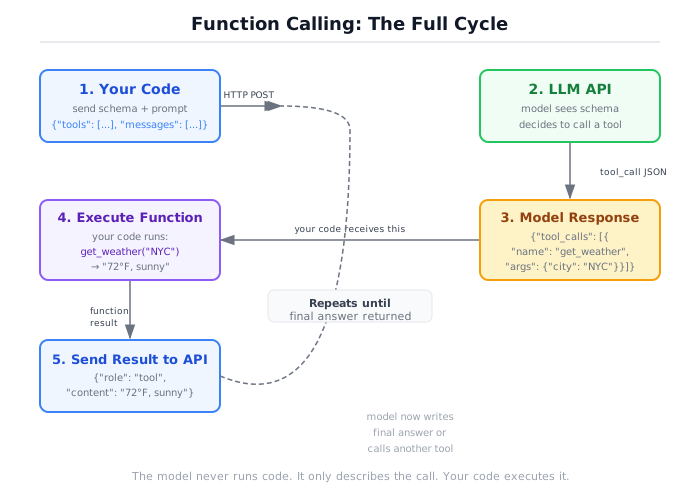
A single-turn assistant that takes a query, selects the appropriate tool, executes it with validated arguments, and returns the result.
What’s inside
src/tools.py— Four tools with Pydantic input validation:calculator(six operations),word_counter(word/character/sentence counts),search(simulated web search with realistic result objects), andfile_reader(reads local files, sandboxed to the project directory).src/assistant.py— TheToolUsingAssistantclass: receives a query, calls the model to select a tool, executes it viaexecute_tool_call(), then calls the model again to produce a final answer. Logs tool selections and validation errors.
How to run
make install

# See all four tools and their schemas
python project/tool-using-assistant/src/tools.py

# Run the assistant demo
python project/tool-using-assistant/src/assistant.py
No API key required. The demo uses MockClient with scripted responses to simulate tool selection.
What you’ll see
The tools demo prints the schema for each registered tool as the model would receive it, then runs direct calls including intentional validation failures:
Registered tools:

  calculator: Perform arithmetic: add, subtract, multiply, divide, power, or modulo.
    - operation [string] required (enum: ['add', 'subtract', 'multiply', 'divide', 'power', 'modulo'])
    - a [number] required
    - b [number] required
  ...

calculator(add, 15, 7) -> 22.0
calculator(sqrt, 9, 0) [invalid op] -> Validation error: ...
word_counter('   ') [empty text] -> Validation error: text must not be empty
The assistant demo runs five queries through the scripted mock and shows the full interaction:
Query:    What is 99 multiplied by 7?
Tool:     calculator({'operation': 'multiply', 'a': 99, 'b': 7})
Result:   693.0
Answer:   99 * 7 = 693
Tokens:   135  Latency: 1.2ms

Query:    What is the capital of France?
Tool:     (none -- direct answer)
Answer:   The capital of France is Paris.
Tokens:   80  Latency: 0.8ms
How this differs from the agent loop
This is a single-turn assistant — one query produces at most one tool call and one answer. It does not loop. That design choice is deliberate: it isolates tool selection and validation from the multi-step loop logic so each concern can be understood independently.
For the full multi-step loop see project/research-agent/.
Connection to the book
Section 0b explains how structured tool calling works: how tools are described to the model as schemas, how the model selects and parameterises them, why Pydantic validation matters before execution, and what happens when the model passes invalid arguments. The tools.py file demonstrates all four steps in a single runnable file. The assistant.py file shows what a real single-turn implementation looks like, including the follow-up call that produces a human-readable answer from a raw tool result.